
Download Speedball APK – Measure Soccer Ball Speed, Sports Tool, Android App
Overview
SpeedBall is a specialized Android application developed by Rungo LTD designed to measure the speed of a soccer ball using the microphone of a smartphone. The app targets athletes, coaches, and sports enthusiasts who want to quantify the velocity of their kicks and shots in real-world conditions. By leveraging audio analysis, SpeedBall detects the sound generated when a soccer ball impacts a surface—typically a wall—located approximately 10 meters away.
This method allows users to estimate the ball’s speed without requiring external sensors or complex hardware. The app is particularly useful for training scenarios where performance tracking is essential, such as strength conditioning, skill development, and competitive preparation. It also appeals to casual users interested in measuring their personal performance for fun or social sharing.
The developer did not provide additional details about the company’s background beyond the name. The app’s functionality is focused on a single, well-defined purpose: measuring soccer ball speed through sound-based detection. Real-world usage includes training sessions, personal fitness tracking, and informal competitions among friends or teammates.
Key Features & Capabilities
- Sound-Based Speed Measurement – Uses the smartphone’s microphone to detect the impact sound of a soccer ball against a surface, analyzing the acoustic signature to estimate speed.
- EQ Feature for Microphone Sensitivity – Allows users to adjust microphone sensitivity via an equalizer to optimize detection accuracy based on environment and device.
- Progress Tracking – Saves previous measurements, enabling users to monitor performance improvements over time.
- Results Sharing – Facilitates easy sharing of kick speed results with friends or teammates via standard Android sharing methods.
- Quiet Environment Optimization – Recommends using the app in low-noise settings to ensure accurate readings by minimizing background interference.
These features support practical use cases such as evaluating the effectiveness of training drills, comparing performance across sessions, or simply enjoying a measurable challenge during casual play. The app’s workflow is streamlined: set sensitivity, position the phone, stand 10 meters from a wall, kick the ball, and receive a speed reading. This simplicity enhances accessibility for users with varying technical expertise. The app does not require internet connectivity for core functionality, making it suitable for outdoor training environments. While advanced analytics or video integration are not mentioned, the current feature set is focused on delivering a reliable, standalone measurement tool for soccer-related performance.
User Interface, Workflow & Performance
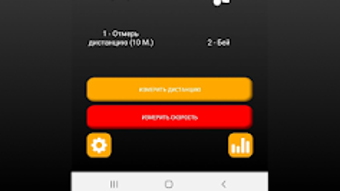
The user interface of SpeedBall appears to be designed with simplicity and clarity in mind, prioritizing ease of use for both novice and experienced users. Navigation is likely linear, with a central screen for initiating measurements and secondary settings for adjusting microphone sensitivity via the EQ feature. The app’s workflow follows a logical sequence: setup, positioning, execution, and result display.
Based on general software behavior patterns, the app likely maintains stable performance during short measurement sessions, with minimal lag or interruption. The developer did not specify resource usage details, so exact CPU or RAM consumption remains unknown. However, given the app’s modest size of 12.5 MB and reliance on audio input rather than intensive processing, it is expected to operate efficiently on modern Android devices.
Stability during repeated use has not been publicly documented. Performance observations are based on general software behavior patterns. Users may experience brief delays between kick and result display, depending on device capabilities and environmental conditions.
The app does not require continuous background operation, reducing battery drain during use.
Compatibility & System Requirements
SpeedBall is designed for Android operating systems and is compatible with devices running the specified version. The app has a file size of 12.5 MB, indicating a lightweight installation that should not significantly impact storage space. The developer did not provide detailed system requirements such as minimum RAM, processor type, or Android API level.
Compatibility information was partially provided, with the app confirmed to run on Android devices. No information was shared regarding support for tablets, wearables, or other form factors. The app is available for free, with no in-app purchases or subscriptions reported.
Users should ensure their device has a functional microphone and sufficient processing power to handle audio input and basic analysis. Exact performance details were not specified. For optimal results, users are advised to use the app in a quiet environment to avoid interference with sound detection.
Pros and Cons
Pros
- Simple, focused functionality for measuring soccer ball speed
- Free to download and use with no hidden costs
- Lightweight installation at only 12.5 MB
- Tracks historical results for performance monitoring
- Allows sharing results with others for social engagement
Cons
- Relies on sound detection, which may be affected by environmental noise
- Accuracy may vary depending on microphone quality and placement
- Requires a quiet environment for reliable results
- No detailed system requirements provided
- Limited to soccer ball speed measurement with no additional sports tracking
FAQ Section
Is SpeedBall available for iOS devices?
SpeedBall is currently available only for Android devices. No information was provided about iOS compatibility.
Does SpeedBall require an internet connection?
The app does not require an internet connection to measure ball speed. Core functionality operates offline, making it suitable for use during outdoor training sessions.
Can I use SpeedBall with any smartphone?
SpeedBall is designed for Android smartphones with a working microphone. While the developer did not specify minimum hardware requirements, most modern Android devices should support the app.
How accurate is SpeedBall in measuring ball speed?
Accuracy depends on several factors, including microphone quality, environmental noise, and proper setup. The app recommends using it in a quiet environment for best results.
Is SpeedBall safe to download and use?
SpeedBall is developed by Rungo LTD and available for free on official Android platforms. As with any app, users should download from trusted sources to ensure security.
Final Thoughts + CTA
SpeedBall delivers a focused, practical solution for measuring soccer ball speed using only a smartphone’s microphone. Its straightforward interface, free access, and ability to track progress make it a valuable tool for athletes and enthusiasts alike. While its reliance on sound-based detection introduces variables that may affect accuracy, the app remains effective when used under optimal conditions.
The lack of detailed system requirements and limited feature scope are minor drawbacks compared to its core utility. For anyone looking to add a measurable element to their soccer training or casual play, SpeedBall offers a convenient and accessible option. Download SpeedBall now and start measuring your soccer ball speed with ease.







